
Your Wishlist &
AI Gift Finder App
Save gift ideas from any store, get AI-powered gift suggestions for anyone on your list, and never pay full price — Wisher tracks prices and alerts you when they drop. Free to download, no sign-up required.


Create a Beautiful Wishlist You'll Actually Want to Share
Create a stunning visual wishlist from any store and share it with friends, family, or colleagues in one tap. Organize your gift ideas by occasion — birthdays, Christmas, weddings, baby showers — and let people shop directly from your list. Your wishlist, your style.


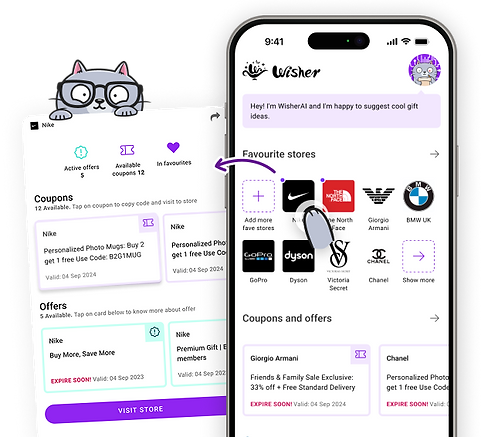
Get Coupon & Discount Alerts for Your Wishlist Items
Add any item to your wishlist and Wisher automatically monitors coupons, promo codes, and discounts across your favorite brands and stores.
No more manually checking deal sites — we notify you the moment an offer appears. Shop smarter, save more.
Real-Time Price Tracking for Your Wishlist


Find the Perfect Birthday Gift with Wisher AI
Birthday coming up and no idea what to get? Tell Wisher AI who you're buying for — their age, personality, and interests — and get a personalized list of birthday gift ideas in seconds. Works for him, her, kids, parents, best friends, or that one colleague who's impossible to shop for.
Love a suggestion? Save it directly to a birthday wishlist anyone can shop from — with price tracking included.

Save Wishes With Wishlist Chrome Extension
Spotted something you love while browsing? Save it to your Wisher wishlist in one click — from any website, any store, any browser. The free Wisher Chrome Extension works on Google Chrome and Microsoft Edge, and syncs everything straight to your phone automatically.
🎁💭🛍️ 50,000+ wishes already saved with Wisher
Wisher's trending & updates
Stay updated with the trendiest wishes, smart gift ideas, and dream board inspiration from Wisher the Cat 😸


Your All-in-One Wishlist & Gift Registry
Your all-in-one wishlist and registry made simple. Collect gifts from any store, sync registries, and organize everything in one wish list. With Wisher as your smart gift finder, giving and receiving the right gift has never been easier.


Frequently Asked Questions
Want to know more about sharing wish list, creating a gift lists and dream boards? Start here.
What is Wisher ?
Wisher is a free wishlist and gift ideas app for iOS and Android. Save products from any online store to your personal wishlist, share it with friends and family so they always know what to get you, and get AI-powered gift suggestions for anyone on your list. Track price drops and get notified the moment an item goes on sale — all in one place. No sign-up required to get started.
Is Wisher free to use ?
Yes — Wisher is completely free to download and use. Save gift ideas from any store, create a wishlist or gift registry, get AI gift suggestions, and track price drops, all at no cost. No subscription, no hidden fees, no sign-up required to get started.
How do I share my Wishlist or Registry with others?
Sharing your wishlist in Wisher takes one tap. Open any list, hit Share, and send the link — by text, email, or directly to WhatsApp, Instagram, or any other app. Anyone who receives the link can browse your wishlist and reserve items without you seeing what they picked, so surprises stay intact. No account needed to view a shared wishlist.
Can I use Wisher as a baby shower registry?
Absolutely. Wisher works perfectly as a baby shower registry — and it's much more flexible than traditional registry systems. Add items from any store: Amazon, Target, IKEA, Etsy, or any other website, all into one shared list. Guests can reserve items directly from your registry so nothing gets bought twice. Share it with one link — no app download required for guests to view and shop. Whether you need a stroller from one store and nursery decor from another, Wisher brings your entire baby shower registry together in one place.
Who can see my Wishlist or Dream Board, and can I make it private?
Your wishlist and gift registry are private by default — only you can see them until you choose to share. Share with specific people via link, or keep everything private. You can also mark individual items as private within a shared list.
Why do I need a Wishlist ?
A wishlist saves you from two of the most common gifting problems: getting gifts you don't want, and forgetting things you do. Instead of dropping hints or sending long texts, you share one link — friends and family shop directly from your list and always get it right. It also works the other way: when you're buying for someone else, their wishlist takes the guesswork out completely. With Wisher, your wishlist works across any store, tracks price drops, and lets you organize ideas by occasion — birthdays, holidays, weddings, and more.
What’s the difference between a Vision Board and a Dream Board?
A vision board is for visualizing your future goals and desires, while a dream board in Wisher focuses on organizing your wishes, gifts, and gift ideas for real-life events.
If someone shares a Gift List with me, how do I buy and reserve Gifts to avoid duplicates?
Open the shared wishlist link — no app download needed. Tap any item to reserve it. Once reserved, it's marked as taken so no one else buys the same gift. The person who owns the wishlist won't see what's been reserved, so the surprise stays intact.
How can I find someone else’s Wishlist, Registry, or Dream Board?
Wisher wishlists are private by design — you can only view someone's list if they share the link with you directly. Open the link in any browser to browse and reserve gifts, no account needed.
How many languages does the Wisher mobile app support?
Wisher is available in 10 languages, making it easy to use worldwide. Currently, the app supports: 🇬🇧 English (UK), 🇯🇵 Japanese (JA), 🇰🇷 Korean (KO), 🇩🇪 German (DE), 🇪🇸 Spanish (ES), 🇫🇷 French (FR), 🇮🇳 Hindi (HI), 🇧🇷 Portuguese (Brazil) (PT-BR), 🇨🇳 Chinese (Simplified) (ZH), and 🇮🇹 Italian (IT), Ukrainian 🇺🇦 (UA), 🇵🇱 Polish (PL).

Download the Free Wishlist & Gift Ideas App!
Save gift ideas from any store, share your wishlist with friends and family, and never pay full price — Wisher tracks prices and alerts you when they drop. Free to download, no sign-up required.
Mobile wishlist app for iOS available on App Store and wishlist for Android - Google Play.